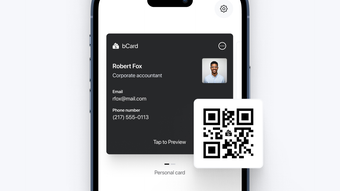

Streamline Networking with bCard
Effortless networking is at the heart of bCard, a digital business card application designed for professionals aiming to modernize their contact exchange process. Built specifically for iPhone users, the app enables seamless creation, customization, and sharing of digital business cards. It eliminates the need for physical cards, offering an eco-friendly alternative that remains accessible and professional in any setting. Whether attending a conference, meeting a client, or connecting at a networking event, bCard ensures your contact details are instantly shared and securely stored.
Target users include entrepreneurs, freelancers, real estate agents, and other professionals who rely on consistent and efficient networking. The app supports unlimited card creation, allowing users to tailor different versions for various contexts—such as client meetings, industry events, or social gatherings. With Apple Wallet integration and QR code sharing, bCard enhances convenience and reliability during contact exchange. Users receive notifications when their QR code is scanned, providing real-time feedback on networking interactions. This feature fosters engagement and helps track outreach efforts.
While the developer did not provide additional system requirements, the app is optimized for iPhone devices. Its lightweight size of 45.2 MB suggests efficient resource usage, though exact performance details were not specified. The app’s focus on simplicity and functionality makes it a practical tool for professionals seeking to reduce friction in professional connections.
Key Features & Capabilities
- Unlimited Card Creation: Users can generate an unlimited number of digital business cards, each customizable to suit different professional scenarios. This flexibility is ideal for users who engage with diverse audiences.
- Apple Wallet Integration: Digital cards can be stored directly in Apple Wallet, ensuring quick access and a polished presentation. This feature enhances credibility and convenience during in-person interactions.
- QR Code Sharing: Each card is assigned a unique QR code for instant sharing. Scanning the code allows others to instantly save your contact information, reducing errors and delays.
- Customizable Fields: Users can personalize card details beyond standard contact information, including social media links, service descriptions, and professional titles.
- Scan Notifications: The app sends real-time notifications when a QR code is scanned, helping users track engagement and follow up effectively.
These features collectively streamline the networking process. For example, a real estate agent can create a card with property listings and a direct messaging link for clients, while a freelancer might include portfolio links and project highlights. The ability to share cards instantly via QR code or Apple Wallet ensures no opportunity is missed during face-to-face interactions.
User Interface, Workflow & Performance
The user interface of bCard is designed with simplicity and efficiency in mind. Navigation is intuitive, allowing users to create and manage cards with minimal steps. The layout prioritizes accessibility, with clear icons and streamlined menus that support quick actions like generating a QR code or adding a new card.
Workflow efficiency is enhanced by the app’s focus on core functions: create, customize, and share. The process of generating a digital card involves selecting a template, inputting details, and choosing a sharing method—all within a few taps. This streamlined approach reduces cognitive load and supports fast adoption.
The developer did not specify resource usage details. However, the app’s size of 45.2 MB indicates a lightweight footprint, which typically correlates with efficient performance. General software behavior suggests stable operation on supported iPhone models, though exact CPU or RAM usage was not disclosed. No stability issues were reported in the provided information.
Compatibility & System Requirements
bCard is designed exclusively for iPhone devices, ensuring compatibility with the iOS ecosystem. The app requires iOS 14 or later, though exact system requirements were not listed. Installation size is 45.2 MB, which is relatively small and suitable for most iPhone storage configurations.
Platform compatibility information is limited to the iPhone platform. The developer did not provide details on specific hardware requirements or supported iPhone models. Users should ensure their device meets the minimum OS version required for app installation. The app’s reliance on Apple Wallet and QR code functionality suggests it leverages native iOS features, which are typically well-optimized on compatible devices.
Pros and Cons
Pros
- Effortless creation and sharing of digital business cards
- Seamless integration with Apple Wallet for easy access
- QR code sharing enables fast, error-free contact exchange
- Unlimited card creation for context-specific networking
- Real-time scan notifications to track engagement
Cons
- Available only on iPhone, limiting cross-platform use
- Customization options may be limited compared to full desktop tools
- No information on offline functionality or cloud sync
- Platform-specific features may restrict flexibility for non-iOS users
FAQ Section
Is bCard available for Android devices?
bCard is currently designed exclusively for iPhone users. The developer has not announced plans for an Android version.
Is the app free to download and use?
Yes, bCard is available at no cost. There are no in-app purchases or subscription fees mentioned in the provided information.
Can I use bCard offline?
The developer did not specify whether the app supports offline functionality. Core features like QR code generation may work offline, but syncing and notifications depend on internet connectivity.
How often does bCard receive updates?
Update frequency is not publicly disclosed. Users are advised to check the App Store for the latest version.
Is my data secure when using bCard?
While the developer did not provide detailed security information, the app leverages Apple’s native security framework for data handling. No public data breaches have been reported.
Final Thoughts + CTA
bCard delivers a focused and effective solution for professionals seeking to modernize their networking approach. Its integration with Apple Wallet, QR code sharing, and real-time scan notifications make it a practical tool for entrepreneurs, freelancers, and real estate agents. The app’s lightweight design and intuitive interface ensure a smooth user experience on iPhone devices.
While its exclusive iPhone availability may limit broader adoption, the app excels within its niche. For users already invested in the Apple ecosystem, bCard offers a reliable, eco-friendly alternative to paper cards with tangible benefits in speed and professionalism.
Download bCard now







